Overview
DataBites is a physical, hands-on museum installation that teaches kids how machine learning works by letting them train, break, and test a real neural network live in under a minute. Visitors place pizza and sandwich figurines on a board, train a model on the spot, and immediately see how their data choices affect model accuracy on a touchscreen-and-display kiosk built for a museum floor.
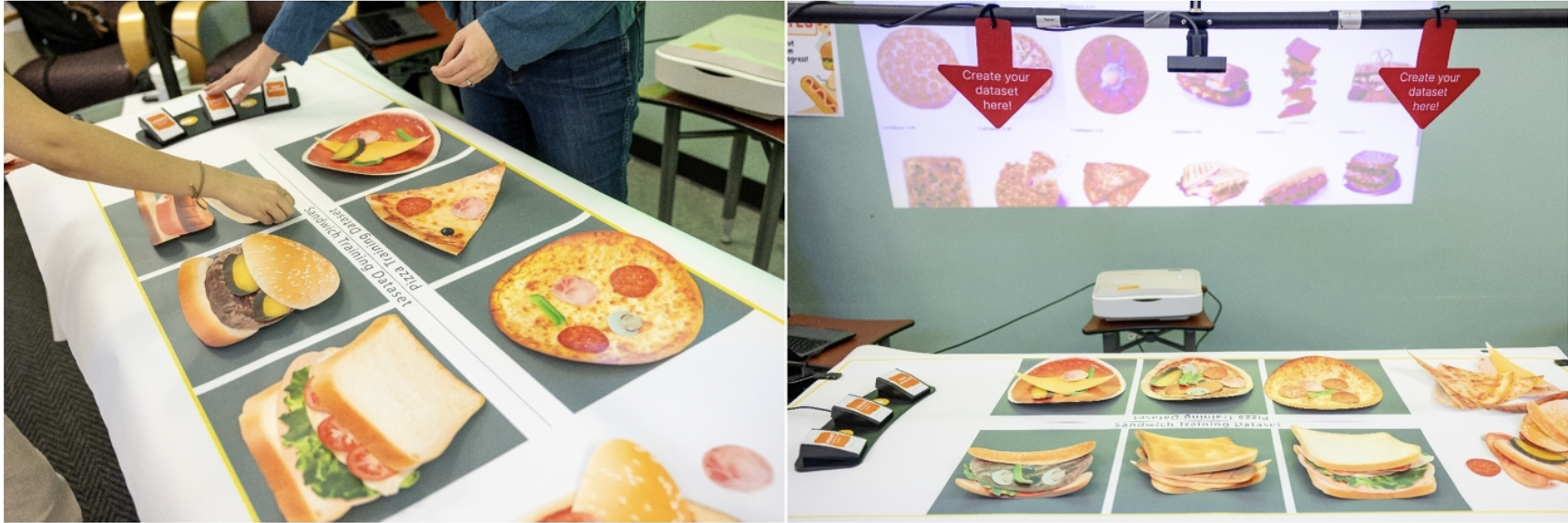
The exhibit is part of an NSF-funded collaboration between Northwestern University’s Creative Interfaces Research and Design Studio and Georgia Tech, exploring how embodiment and creativity can foster AI literacy in informal learning environments. DataBites was designed, tested, and evaluated in situ at Chicago’s Griffin Museum of Science and Industry.
Research Focus
- Physical manipulation shapes how learners reason about ML in ways a screen-based interface does not automatically preserve.
- The study asks whether learners think about the system differently when dataset construction is embodied versus screen-mediated, not just whether they learn the same content.
- Data collection includes interaction logs, screen recordings, and learning-talk coding of audio transcripts.
- Analysis targets reasoning patterns: whether learners connect prediction errors to dataset decisions, whether they experiment iteratively, and where the interface breaks that chain.
- Redesign follows findings: if learners treat the dataset as static, the workspace becomes spatially malleable; if they cannot connect errors to data gaps, model uncertainty becomes visible and repairable.
- Core question: can embodied interaction be reimagined for a web interface, not just approximated in one?
The Experience
Each visitor session mirrors a full ML workflow in five fast stages:
- Dataset Creation: A kid arranges food figurines on a board (pizza on the left, sandwiches on the right) and taps Train. A camera captures the board as a single screenshot.
- Training: The backend slices the screenshot into six labeled training images and fine-tunes a classifier in about three seconds. In parallel, a slower process visualizes what the model is “looking at.”
- Testing: The kid selects nine gallery images as a test set.
- Results: The display shows each test image with the model’s prediction so visitors can instantly see where the model succeeded or failed.
- Reset: The session model is discarded and the exhibit resets for the next visitor, with no memory of previous runs.
The key pedagogical move is deliberate: the backend does not inspect what object is physically present on each side of the board. It blindly assumes left = pizza and right = sandwich. If a visitor intentionally places a sandwich on the pizza side, the model learns the wrong label and fails later. It teaches garbage in, garbage out through direct interaction.
Design Principles
- No instructions and no facilitator: the interface had to explain itself to a 10-year-old in under 30 seconds.
- Each stage of the ML pipeline (dataset creation, training, classification, results) is a distinct visible moment, not a background process.
- Animation playback speed recalculates at runtime to match narration clip duration, keeping voice and motion locked together as audio changes.
- The dataset creation screen is designed to feel like a continuation of the physical table interaction, not a mode switch.
- Model failures are the point: the results screen makes misclassifications specific enough to trace back to dataset decisions.
- Button feedback uses image swaps and CSS scale transforms instead of hover states, built for deliberate single taps on a kiosk.
Technical Architecture
DataBites is a full-stack, dual-screen system:
- Backend (Python/Flask): One Flask app exposes training, testing, and generated-asset endpoints (
/api/train,/api/test,/api/masks) plus static routes for debug slices and segmentation masks. - Two-stage model design: A ResNet18 backbone is pre-trained offline in Databites-MoE, loaded frozen at server start, and converted to a feature encoder by replacing its final layer with identity. Each session then trains a fresh
nn.Linear(512, 2)head (~1,026 parameters) on top of frozen features. This enables genuine live training on CPU in about three seconds over 25 epochs on six images. - Background SAM segmentation: Meta’s Segment Anything Model runs in a background thread, detects visual regions, and groups them into “large” and “small” features by pixel area. Since SAM takes roughly two minutes on CPU,
/api/trainreturns immediately after fast head training, and the frontend polls/api/masksevery 10 seconds until segmentation is ready. - Frontend (React): A touch controller and a large display run as separate windows of the same React app and synchronize in real time via the native BroadcastChannel API, avoiding websockets for UI state sharing.
Engineering Challenges Solved
- Making real training feel instant: Decoupled a fast disposable linear head from a slow frozen backbone so training could run live on museum PCs without GPUs.
- Keeping UX responsive despite slow vision inference: Ran SAM asynchronously and polled for completion instead of blocking the interaction loop.
- Fixing cross-window sync bugs: Resolved duplicate BroadcastChannel sends and corrected schema mismatches (
item.predictionvsitem.predicted) that caused incorrect display labels. - Tuning segmentation for real museum conditions: Iterated SAM area thresholds to better separate large objects (food items) from smaller toppings under noisy lighting and camera variability.
- Improving model performance on physical artifacts: Expanded and retrained the backbone dataset from 200 to 252 images focused on the exhibit objects, improving held-out accuracy from 87.5% to 97.3%.
- Hardening deployment on shared hardware: Diagnosed environment-specific issues (including Node version mismatch failures) and established a git workflow that avoids conflicts from runtime-generated files.
Tech Stack
Python · Flask · PyTorch (ResNet18 + linear probe) · Segment Anything Model (SAM) · React · BroadcastChannel API · Flask-CORS
Why It Is Interesting
DataBites compresses the machine learning lifecycle into a 60-second physical experience: collect data, train a model, evaluate results, and observe failure modes. The core challenge was not maximizing benchmark accuracy. It was making a real model fast enough, transparent enough, and robust enough to run repeatedly in front of museum visitors on commodity CPU hardware.