A cozy macOS app where half-formed ideas rise like dough. Jot one down, give it a recipe, and watch its little pixel loaf bake as you make progress.
Personal project · native macOS app · Swift
Most of my ideas start out half-baked: a line in a notes app, a tab I’ll “get back to,” a thought I lose by dinner. Notes apps are good at catching them and bad at helping them grow. Project tools go the other way, asking for structure an idea doesn’t have yet. I wanted something in between, a place where a raw idea can sit, collect thoughts, and slowly turn into something real.
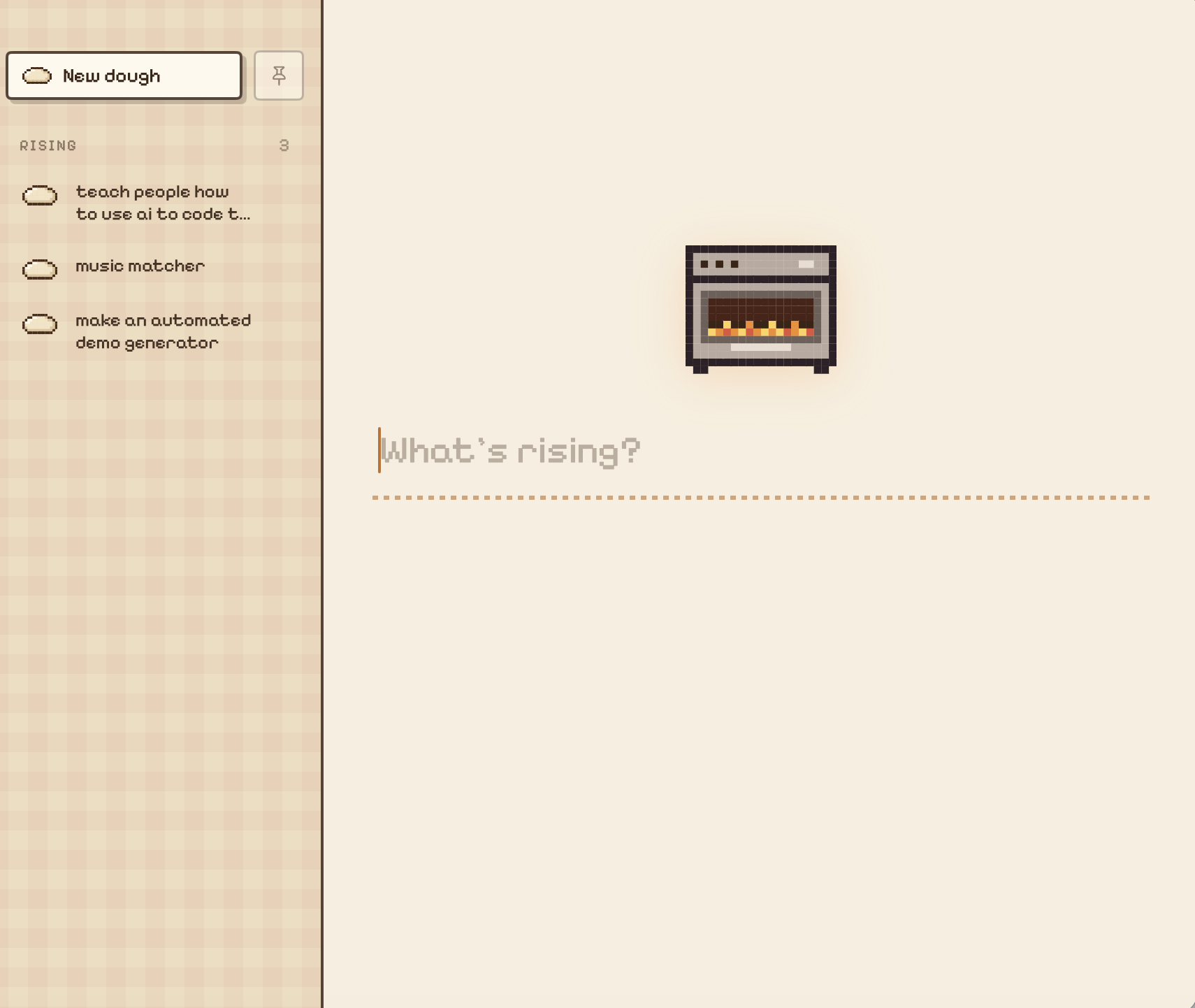
Half-Baked is that place, dressed up as a bakery. A steaming pixel loaf floats on the desktop with a count of ideas still rising. Click it and a panel opens to an oven and a single prompt: What’s rising? Type an idea, hit Return, and it floats over onto the shelf. From there, every idea gets its own counter to work on, and its loaf goes from raw dough to golden bread as it comes together.
Home: the oven, the prompt, and the shelf of ideas still risingThe launch video, made automatically by DemoDay, which started as an idea on this very shelf
What It Does
Jot It Down
The home screen is one big text field, already focused. Type an idea and press Return: the words shrink and fly across into the “Rising” list on the shelf. Capturing a thought should take a second, so there are no fields, tags or folders to fill in first.
Give It a Counter
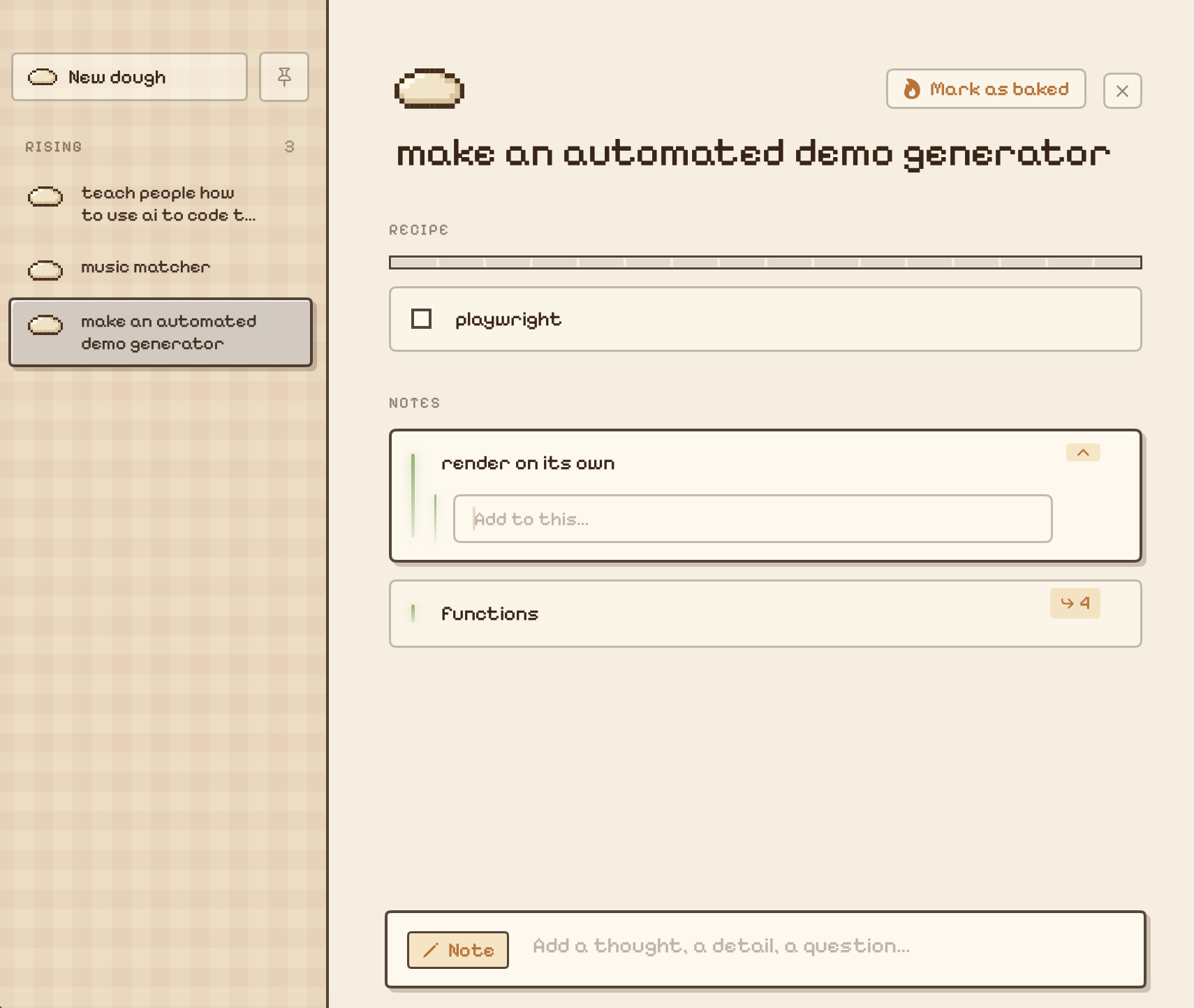
Each idea opens into its own workspace with two parts: a Recipe of steps to tick off, and Notes for loose thoughts. Tab switches between adding a note and adding a step. Click any step or note to open a thread under it for findings, answers and follow-ups, so research stays attached to the question it answers.
Watch It Bake
An idea’s loaf shows how far along it is. It starts as raw dough, rises in a bowl once some of its recipe is done, becomes a shaped loaf past the halfway mark, and turns golden and steaming when it’s marked as baked. Finished ideas move to a “Baked” shelf instead of disappearing.
Always Within Reach
The loaf icon floats above every window and Space, and can be dragged anywhere. ⌃⌥B opens the panel from any app, and it tucks itself away when you click elsewhere unless you pin it open. There’s no Dock icon to manage.
An idea’s counter: a recipe of steps, notes, and a thread opened under one of them
Design Process
The bakery metaphor came from the name, and it ended up shaping the whole app. Ideas are “dough,” the list is “Rising,” and finishing one is “Mark as baked.” The metaphor turned progress into something you can see at a glance: you don’t need to read a percentage when the loaf is visibly closer to bread.
The look is warm and low-contrast on purpose: flour-colored backgrounds, a faint gingham tablecloth on the shelf, chunky pixel cards with hard offset shadows, and a single pixel typeface (Pixelify Sans) for everything. Each idea gets its own “flavor” color: honey, strawberry jam, blueberry, matcha, cinnamon or apricot. Dark mode is a warm oven at night rather than a gray inversion. Small moments of motion, like the idea flying onto the shelf, the flickering oven flames and the bobbing loaf, give the app a bit of life without getting in the way.
How It’s Built
SwiftUI on AppKit
The interface is SwiftUI, hosted in two AppKit windows: a borderless, always-on-top window for the floating loaf and a panel that places itself beside it on whichever side of the screen has room. A Carbon hot key provides the global shortcut, and the login item uses SMAppService.
Pixel Art in Code
Every sprite (the dough, the bowl, the loaf, the oven) is drawn from small character grids, one letter per pixel, and painted onto a SwiftUI Canvas. Steam and flames are frame swaps on a timer. Even the app icon is generated by a Swift script at build time.
Scales With the Window
Instead of reflowing, the whole interface zooms: a zoom factor computed from the window size is passed down through the SwiftUI environment, so type, spacing and pixel sizes grow together and the pixel art stays crisp at any size.
Local and Forgiving
Ideas are saved as a plain JSON file in Application Support on every change. No accounts, no server, no network calls. Decoding is tolerant, so files saved by older versions still load as the data model grows, and deleting an idea can be undone.
Stack
App
Swift · SwiftUI · AppKit · Canvas
macOS
Floating windows · global hot key · login items · built with swiftc and a shell script
Process
Interaction design · pixel art · visual metaphor · AI-assisted development (Claude Code)
End of file
You made it to the end!Coin already collected
+1 coin · +25 XP. Thanks for reading this far.You’ve read this one before. Thanks for coming back.